
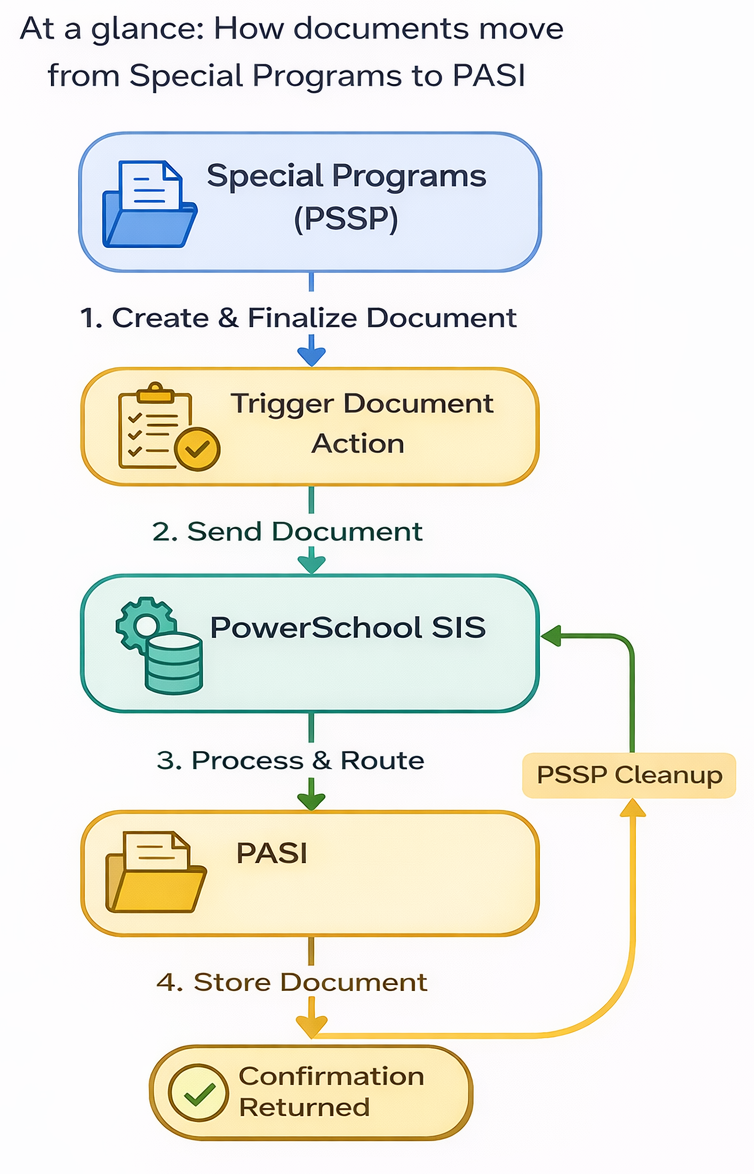
The integration between Special Programs (PSSP) and the Provincial Approach to Student Information (PASI) enables seamless transfer and centralized storage of finalized student documents.
-
PASI acts as the provincial repository for student information and documents.
-
PSSP generates and manages student program documents.
-
PowerSchool SIS (PS SIS) acts as the integration bridge, handling document transfer to PASI.
Key Outcome:
Once documents are finalized in Special Programs, they can be securely transmitted to PASI and stored centrally.
Integration Architecture
System Roles
|
System |
Role |
|---|---|
|
Special Programs (PSSP) |
Generates documents and initiates transfer |
|
PS SIS |
Middleware handling document attachment and transfer |
|
PASI |
Final storage repository |
High-Level Flow
-
Document is created and finalized in PSSP
-
PSSP sends the document to PS SIS via Document Attachment
-
PS SIS uploads document to PASI
-
PASI stores the document as part of the student record
-
PSSP may purge the document after successful transfer
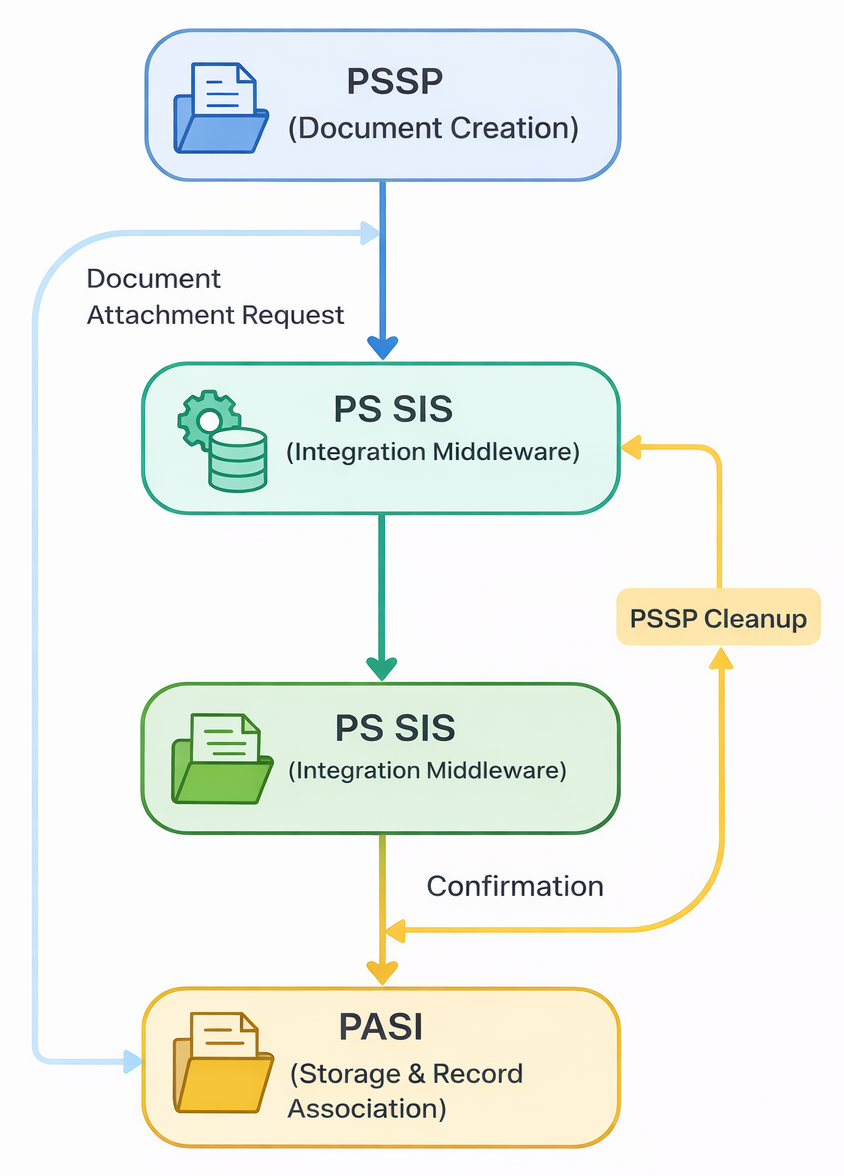
PS SIS treats PASI as external storage for document attachments
Key Capabilities
Document Upload
-
Upload occurs only after document finalization
-
Uses the Document Attachment Provider capability
-
Triggered via plugin-based integration
Automated PDF Generation
-
Documents can be generated through:
-
List reports
-
Configured document actions
-
Secure Transfer Workflow
-
Transfer initiated from PSSP
-
Routed through PS SIS APIs
-
Delivered to PASI securely
Data Cleanup
-
After successful transfer:
-
PSSP can purge local PDF copies
-
Ensures reduced storage footprint
-
User Workflow
Step-by-Step Process
Step 1: Prepare Document
-
Ensure document is:
-
Complete
-
Approved/finalized
-
Associated with the correct student record
-
Step 2: Trigger Document Action
-
Use configured Document Action
-
Ensure required fields are populated
-
Document becomes available in the list/report
Step 3: Generate and Send
-
System generates PDF
-
PSSP sends a transfer request to PS SIS
Step 4: Transfer to PASI
-
PS SIS:
-
Receives document
-
Uploads to PASI
-
-
PASI stores the document under the student profile
Step 5: Post-Transfer Handling
-
Confirm successful upload
-
System may:
-
Remove local copy
-
Log transfer status
-
Technical Environment
Hosting & Infrastructure
-
PSSP is hosted on:
-
AWS (Canada region) currently
-
Planned migration to Azure (no expected disruption)
-
-
Architecture:
-
Single web server
-
Single SQL server per tenant
-
Multi-Tenant Consideration
-
Each district/customer:
-
Has its own database
-
Typically has a 1:1 integration with PS SIS
-
Implication:
Each tenant relies on its SIS instance to handle PASI integration.
Integration Dependencies
Required Components
-
PS SIS with:
-
Document Attachment Provider support
-
PASI integration enabled
-
-
PSSP enhancements:
-
Document attachment endpoints
-
Document action configuration
-
-
PASI availability:
-
Central repository
-
API endpoints (via SIS)
-
Data Flow Summary
Known Gaps / Future Considerations
The following areas require further definition:
-
Document lifecycle actions:
-
Delete
-
Update / Replace
-
-
Handling:
-
Document amendments
-
Multiple language versions
-
-
Error handling:
-
Retry logic
-
Failed transfer scenarios
-
Governance & Release Context (PASI)
From the PASI project structure:
-
Development and release pipelines use structured codelines:
-
Andromeda (Development)
-
Caribou (Release/UAT)
-
Mount Alberta (Integration/archival)
-
Implication for users:
Enhancements to integration may follow staged release cycles before reaching production.
Best Practices
-
Only send finalized documents
-
Validate the student association before transfer
-
Monitor transfer logs regularly
-
Avoid duplicate uploads
-
Coordinate with the SIS team for configuration issues
Troubleshooting (Quick Guide)
|
Issue |
Likely Cause |
Action |
|---|---|---|
|
Document not appearing in PASI |
Transfer failure |
Check PS SIS logs |
|
Missing document in the list report |
Required fields not set |
Verify document action config |
|
Duplicate uploads |
Re-triggered workflow |
Validate status before resubmission |
|
Transfer delay |
Integration latency |
Retry after confirmation |
Summary
This integration creates a reliable, scalable pipeline:
-
PSSP → Document creation
-
PS SIS → Secure transport
-
PASI → Central storage
It ensures:
-
Compliance with provincial requirements
-
Centralized student records
-
Reduced duplication and manual handling