This report presents the distribution of students with disabilities across grade levels in Indiana public schools. It is intended to provide educators, administrators, and policymakers with a clear view of how disability prevalence varies by grade, supporting strategic planning, resource allocation, and compliance with state and federal special education requirements. The data reflect the number of students served under the Individuals with Disabilities Education Act (IDEA) and reported to the Indiana Department of Education (IDOE).
Submission requirements
This is a pre-configured report and has no submission criteria as a prerequisite.
Generate report
-
From the Reporting menu, choose Standard report.
-
Click Public Students Report, then click Disability - By Grade Report.
-
Use the drop-down list for the field Organizational Location Filter to select the name of an institution.
-
Click Update Report with Values.
Report Field Description and Criteria
|
|
Grade 1 |
Grade 2 |
Grade 3 |
Grade 4 |
Grade 5 |
Grade 6 |
Grade 7 |
Grade 8 |
Grade 9 |
Grade 10 |
Grade 11 |
Grade 12 |
KG - Morning |
Pre-kindergarten (Ages 3 - 5) |
Total |
|
Autism Spectrum Disorder |
|
|
|
|
|
|
|
|
|
|
|
|
|
|
|
|
Blind or Low Vision |
|
|
|
|
|
|
|
|
|
|
|
|
|
|
|
|
Deaf or Hard of Hearing |
|
|
|
|
|
|
|
|
|
|
|
|
|
|
|
|
Deaf-Blind |
|
|
|
|
|
|
|
|
|
|
|
|
|
|
|
|
Developmental Delay (Ages 3-8 only) |
|
|
|
|
|
|
|
|
|
|
|
|
|
|
|
|
Emotional Disability |
|
|
|
|
|
|
|
|
|
|
|
|
|
|
|
|
Intellectual Disability |
|
|
|
|
|
|
|
|
|
|
|
|
|
|
|
|
Language Impairment |
|
|
|
|
|
|
|
|
|
|
|
|
|
|
|
|
Moderate Intellectual Disability |
|
|
|
|
|
|
|
|
|
|
|
|
|
|
|
|
Multiple Disabilities |
|
|
|
|
|
|
|
|
|
|
|
|
|
|
|
|
Orthopedic Impairment |
|
|
|
|
|
|
|
|
|
|
|
|
|
|
|
|
Other Health Impairment |
|
|
|
|
|
|
|
|
|
|
|
|
|
|
|
|
Severe Intellectual Disability |
|
|
|
|
|
|
|
|
|
|
|
|
|
|
|
|
Specific Learning Disability |
|
|
|
|
|
|
|
|
|
|
|
|
|
|
|
|
Speech Impairment |
|
|
|
|
|
|
|
|
|
|
|
|
|
|
|
|
Traumatic Brain Injury |
|
|
|
|
|
|
|
|
|
|
|
|
|
|
|
|
Total |
|
|
|
|
|
|
|
|
|
|
|
|
|
|
|
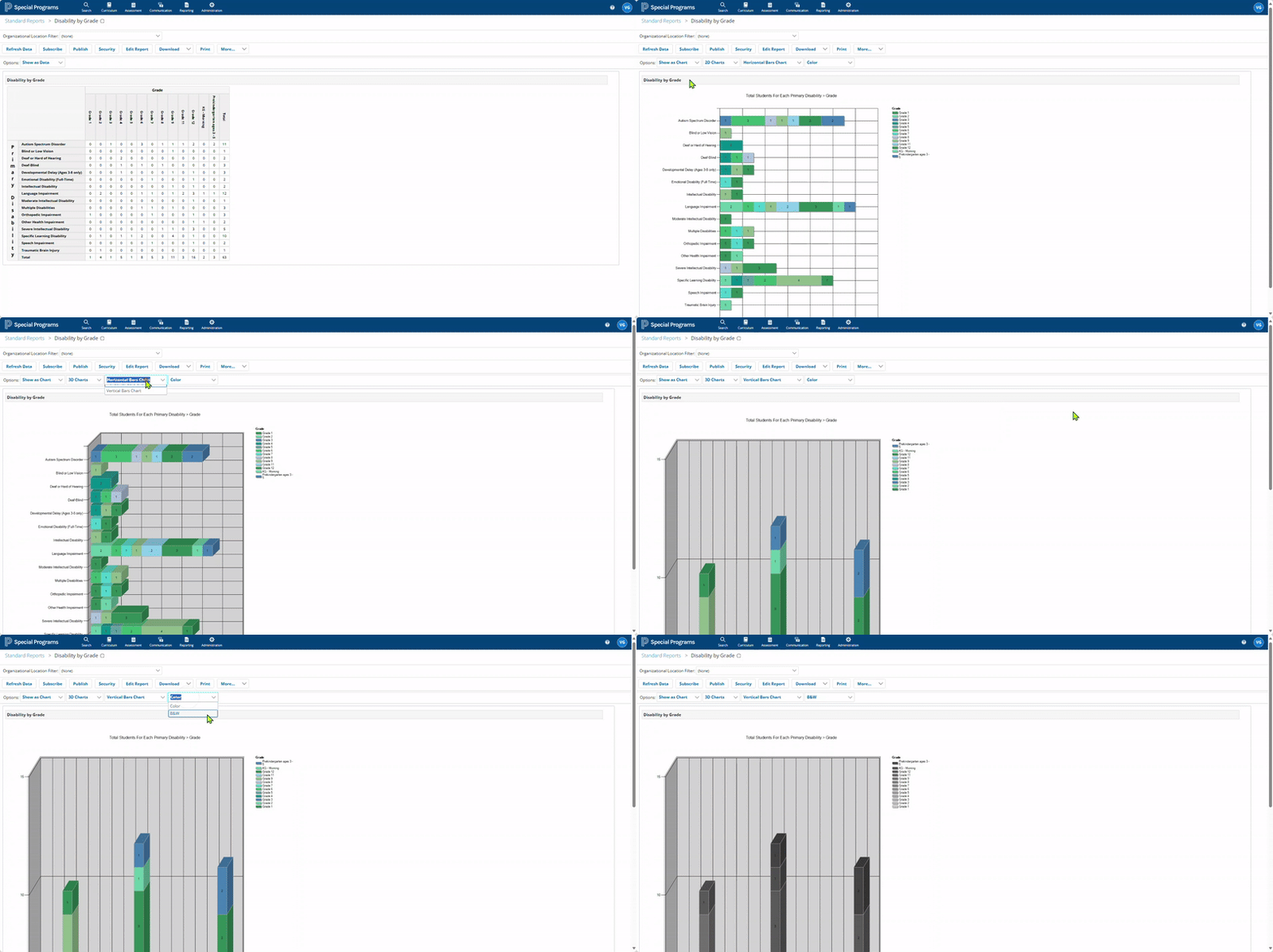
Viewing Report Data as Graphs
Go to Options, for the first drop-down, select ‘Show as Chart’.
This will reveal three further sub-menu options.
-
The first drop-down gives two options: 2D Charts and 3D Charts.
-
The second drop-down gives two options: Vertical Bar Charts and Horizontal Bar Charts.
-
The third drop-down offers two options: Color and B&W.
All three sub-menus are agnostic of each other.
Thus, based on various combinations, the system renders the statistical data from the tabular report.
Choices for the ‘Colors’ in the graphs are hardcoded, therefore restricted to the preconfigured gradients.
The following animation shows the sequence of steps to generate the Disability by Grade report in a graphical format.