
This document outlines the requirements for writing back data to eSchoolPlus SIS from PowerSchool Special Programs.
-
Step One: Create a list report for each table and/or set of data for writeback.
-
Step Two: Set up a list report export configuration for each list report.
Development and Configuration Requirements
To Create the List Reports
-
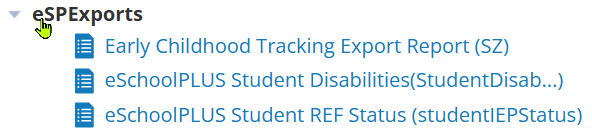
Created in eSPExports Report folder.
-
The standard for creating list report is to include the export type in the list report title.
-
Every list report for eSchoolPlus exports need a column with the title “IntegrationIDT”. The value would almost always be “LEFTSTRING(IntegrationIDT,POSITIONSTRING("-",IntegrationIDT))+CHARACTER(ID)”.
-
If you wish to include other fields not necessary for the actual writeback, you can just use the “#” as the first character in the column title and the export process will ignore that field. An example of a field that might be included is the student name. This would allow users to identify the student more easily.
To Create Export Configuration
-
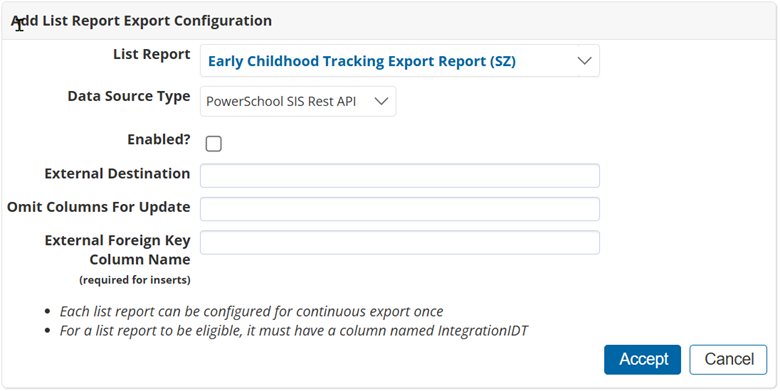
Navigate to Configuration > Integration > Export
-
Click + to add List Report Export Configuration.
-
For each list report export configuration, there is a Destination and an Export Algorithm.
List Reports Supported by eSchoolPLUS Data
eSchoolPLUS School Age Program (StudentProgramStatus )
Recommended naming convention: [Report Title (StudentProgramStatus)].
This report indicates the configurator for the destination/export algorithm to use for this report.
Required Column Heading Titles
programID, fieldNumber, programStatusCode, startDate,endDate.
programID and fieldNumber are almost always hard-coded to the eSchoolPlus program and field number for the Registration Program field being updated. This is defined in the reg_program_setup table in eSchoolPlus.
Sample:
|
State ID |
Integration IDT |
programID |
fieldNumber |
programStatusCode |
startDate |
endDate |
|
|
|
AR_SA |
1 |
Withdrawal_reason |
|
|
Export Configuration
-
External Destination: eSchoolPLUS/StudentProgramStatus
-
Export Algorithm: StudentProgramStatus export
eSchoolPLUS Student 504 StatusAR (studentIEPStatus)
The report will include all students currently receiving a 504 Plan or who have received one in the past.
Report Selection Description: The report will include all students who are currently receiving a 504 Plan or have received a 504 plan in the past.
Student Selection Formula: IntegrationIDT is not empty AND (IS_504 = True OR ( Section504StartDate is not empty AND Section504ExitDate is not empty ) AND (addyears(-1, currentdate()) <= inactiveSince or inactiveSince is empty)) (include inactive students)
|
IntegrationIDT |
#Last Name |
#First Name |
studentId |
hasIEP |
IEPStatus |
IEPIntegration |
statusDescription |
startDate |
exitDate |
exitReason |
|---|---|---|---|---|---|---|---|---|---|---|
|
|
|
|
|
|
|
|
|
|
|
|
(StudentDisab...)
Recommended naming convention: [Report Title (StudentDisab…)]
This will indicate to the person configuring the list report export which destination/export algorithm to use for this report.
-
The actual eSchoolPlus table being updated is reg_disabilities.
-
Other fields (column titles) necessary for this type of writeback besides IntegrationIDT include:
-
primaryDisabilityCode, secondDisabilityCode, thirdDisabilityCode, triggerDate, startDate, endDate, giftedEligible, eligible.
-
GiftedEligible is a Y/N field.
-
|
Integration IDT |
primaryDisabilityCode |
secondDisabilityCode |
thirdDisabilityCode |
triggerDate |
startDate |
endDate |
giftedEligible |
eligible |
|
|
|
|
|
|
|
|
|
|
Export Configuration
-
External Destination: eSchoolPLUS/StudentDisability
-
Export Algorithm: StudentDisabilities export
eSchoolPLUS Student IEP Status (studentIEPStatus)
Recommended naming convention: [Report Title (StudentIEPStatus)]
This will indicate to the person configuring the list report export configuration what destination/export algorithm to use for this report.
-
The actual eSchoolPlus table being updated is reg_iep_status.
-
Other fields (column titles) necessary for this type of writeback besides IntegrationIDT include:
-
Studentid, IEPIntegration, hasIEP, IEPStatus, statusDescription, startDate, exitDate, exitReason, eligible.
-
Eligible, IEPIntegration, and hasIEP are Y/N fields.
-
IEPIntegration field is usually hard coded to “Y”.
-
|
Integration IDT |
Studentid |
IEPIntegration |
IEPStatus |
statusDescription |
startDate |
exitDate |
exitReason |
eligible |
|
|
|
|
|
|
|
|
|
|
Export Configuration
-
External Destination: eSchoolPLUS/StudentIEPStatus
-
Export Algorithm: StudentIEPStatus export
eSP Export Screen 5090 SY (Plus360DistrictDefined)
Recommended naming convention: [Report Title (Plus360DistrictDefined)]
This will indicate to the person configuring the list report export configuration what destination/export algorithm to use for this report.
-
The actual eSchoolPlus table being updated is reg_user.
-
Other fields (column titles) necessary for this type of writeback besides IntegrationIDT include:
-
Studentid, screenType, screenNumber, 1,2,3 (etc, for each field number)
-
If you are writing back to a screen number that can have multiple values (list), then an additional field is needed: listSequence
-
screenType is usually “R” for any student data. This would go to the table “reg_user”.
-
Screen number would be hard-coded to a numerical value.
-
Each column heading that is for a specific field number in eSchoolPlus would be a numerical value.
-
A column heading of “1” would be written to field number 1 in eSchoolPlus.
-
This is generally the “value” or piece of data you are attempting to writeback. Multiple fields can be included in a single screen number.
-
-
This listSequence can be thought of as the row value.
-
The existence of this field in the report indicates that you would use the eSchoolPLUS/PLUS360DistrictDefinedList destination and the export algorithm of MultiValuedFieldExport export.
-
You need to include this field if multiple fieldNumber values are included in the report.
-
This value can be 1 to x.
-
-
|
Integration IDT |
Studentid |
screenType |
screenNumber |
fieldNumber |
|
|
|
R |
|
|
Export Configuration
If there are multiple numbered columns in the report:
-
External Destination: eSchoolPLUS/PLUS360DistrictDefinedList
-
Export Algorithm: DistrictDefinedList export
If there is only a single numbered column in the report:
-
External Destination: eSchoolPLUS/PLUS360DistrictDefined
-
Export Algorithm: MultiValuedFieldExport export
Referral eSchoolPLUS Export Report (RF)
The report will include all students (active and inactive) where the student's referral date (in the Referral profile) is within the Globals reporting date range "Referral Tracking (RF) Start Date" and "Referral Tracking (RF) End Date" and where the student’s IntegrationIDT is not blank.
|
StudentID |
#Last Name |
#First Name |
ResidentLea |
IntegrationIDT |
TransPartC |
CtoBConcurrent |
DateofReferral |
ParentConsentDate
|
InitEvalDate
|
EvalExceed60Day
|
#Eval Reason Desc |
Eval |
|---|---|---|---|---|---|---|---|---|---|---|---|---|
|
|
|
|
|
|
|
|
|
|
|
|
|
|