
Templatized Documents allow customers to quickly create their own custom document templates based on pre-configured, PSSP-approved templates. This guide outlines how to access and use this feature, which is only available to customers with the Templatized Document Templates module enabled.
What You Need to Know
-
Templatized Document Templates and their categories are hidden from all users, including Admins.
-
They are only accessible through a controlled creation flow.
-
This feature is only available to customers who have the Templatized Document Templates module enabled.
Creating a New Custom Document Template
Step 1: Navigate to Document Templates
-
Log in as an Admin user.
-
Go to the Document Templates section.
-
If your organization has the Templatized Document Templates module enabled, you will see a button above the list of existing templates labeled: Add New Document Template
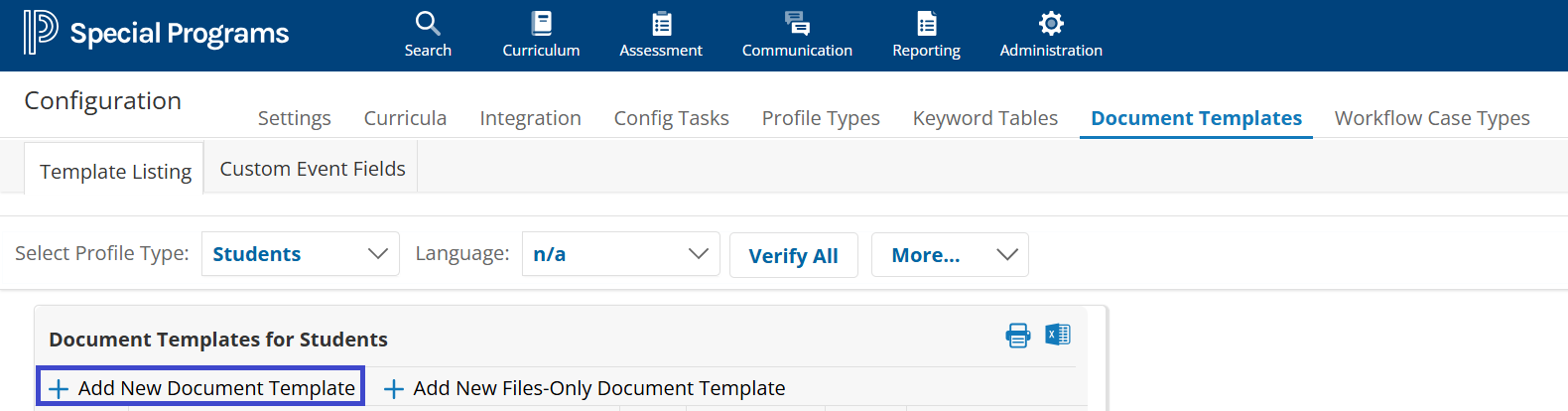
Step 2: Create the Template
Clicking Add New Document Template will launch a simplified creation workflow.
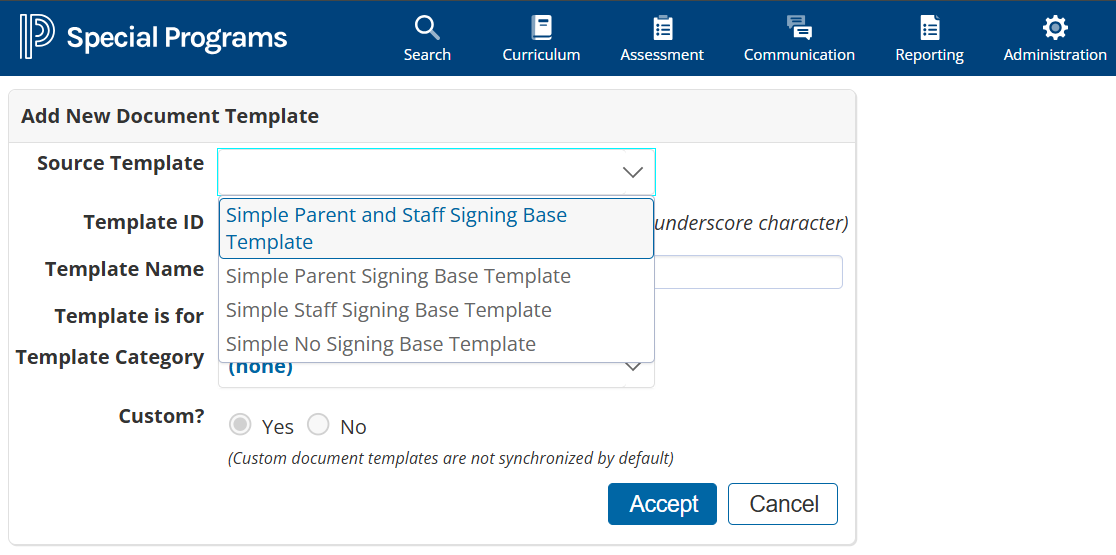
You will need to:
-
Select a Source Template
These are the hidden templates pre-approved by PowerSchool. -
Enter a Template ID and Name
The name must end with an underscore (_) to indicate it is a customer-created template. -
(Optional) Choose a Category
Categories that include the original templatized templates are filtered out and will not appear in the list.
Editing Your Custom Template
Once your custom document template is created, you can use the Easy Edit functionality to customize it.
You Can:
-
Add, edit, and delete custom fields
-
Use Easy Edit to enter content on the form that references your custom fields
-
Set basic template behavior options
-
Delete the custom template (if you created it)
You Cannot:
-
Edit non-custom fields provided in the original templatized document template
-
Set up data flow from the document to profile (only profile → document is supported)
Future Updates & Maintenance
Custom templates created from templatized templates are not linked to future model updates.
Updates to the base templatized document templates will not affect your custom versions.
Summary
|
Feature |
Supported? |
|---|---|
|
Create from Templatized Template |
✅ Yes |
|
Edit custom fields |
✅ Yes |
|
Edit model-provided fields |
❌ No |
|
Profile → Document data flow |
✅ Yes |
|
Document → Profile data flow |
❌ No |
|
Auto-updates from model releases |
❌ No |