
Under Administration > Configuration, select the Document Templates tab. Here, you need to configure two settings:
Select the document template
-
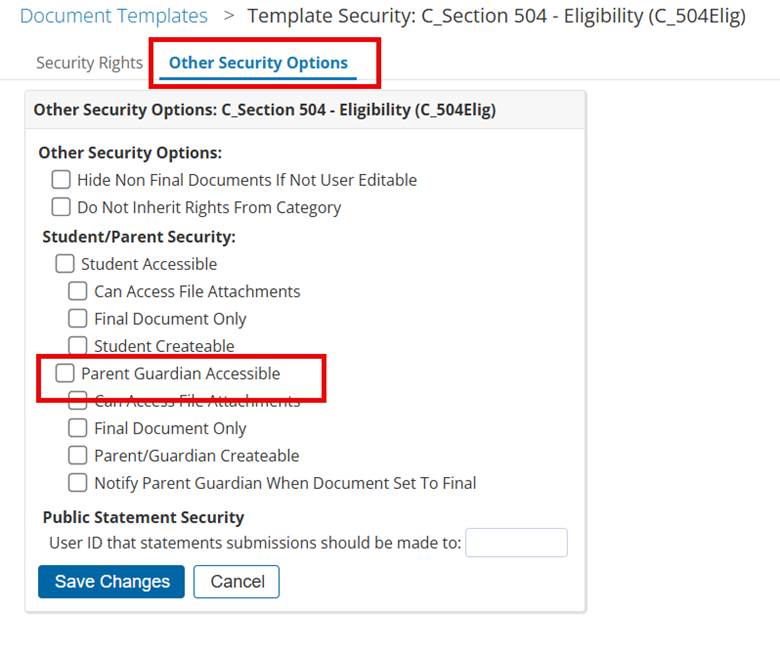
Locate the document template you want to display in the MyPowerHub tile and click on the padlock for security verification.

-
Go to Other Security Options and select the Parent Guardian Accessible checkbox.
-
You will need to do this for each document template that will be displayed in the MyPowerHub tile.
Set Template Properties
-
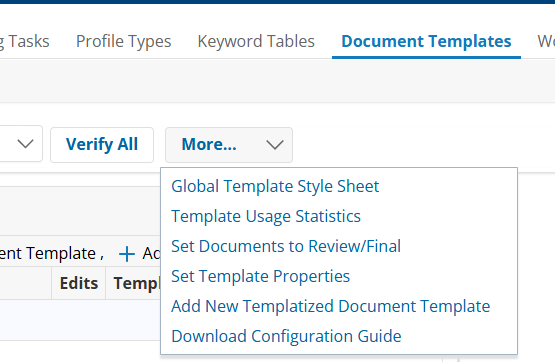
From the Document Template page, click on the More… dropdown and select Set Template Properties.
Only users logged in as the Admin User can view and select this feature.
-
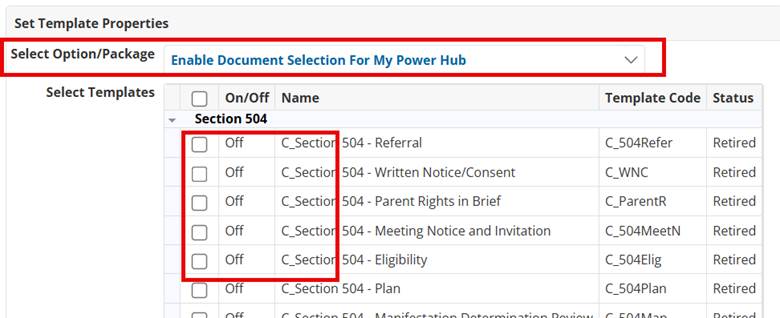
Select "Enable Document Selection for My Power Hub" in the "Select Option/Package” dropdown.
-
From here, you can select up to 10 documents to display in the MyPowerHub tile.
-
Both settings must be selected for a document to display in the MyPowerHub tile. Selecting only one will not display the report.