Overview of Special Programs
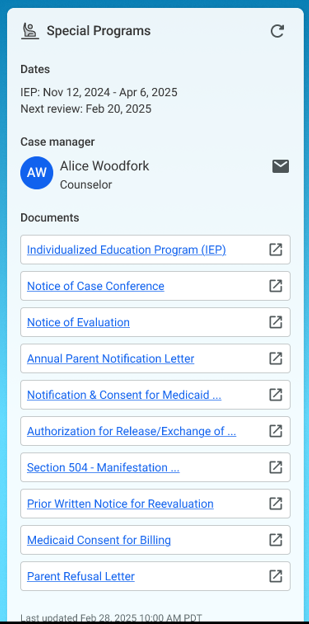
The Special Programs widget provides a summary view of a student’s special education. It enables educators, counselors, and administrative staff to quickly access essential case information and documentation for compliance, planning, and communication purposes.
In its current deployment, the tile is available only to parents and guardians.
Dates
This section specifies the IEP Dates
-
IEP Dates: Displays the current start and end dates of the Individualized Education Program (IEP).
-
Next Review: Indicates the next scheduled review date for the IEP.
Case Manager
This section introduces you to your child’s Case Manager
-
Name & Role: Shows the assigned case manager’s name and title.
-
Contact Icon: The email icon allows direct messaging to the case manager.
Documents
Presents a list of quick-access documents linked to the student’s Special Programs records.
Each entry is hyperlinked and launches in a new tab or viewer when selected.
The document list can be accessed from within the Special Programs Application.
Displaying documents in the widget:
-
The widget will display up to 10 documents selected by the District Administrator.
-
Whether a document is displayed in the widget is controlled from with the SpED Application.
-
The documents are listed in sort order, with the most recent modification and creation dates displayed at the top.
Each document has an external link icon indicating it opens outside the current view. Metadata
-
Last Updated Timestamp: Displays the last time this widget’s data was refreshed.
Usage Notes:
-
This widget is read-only and intended for informational and reference purposes.
-
Ideal for quick overviews during meetings or when preparing for evaluations or parent conferences.
-
Document access may depend on permissions granted to the user’s role.